








On this page
Key takeaways
An enrichment waterfall asks data providers in order and stops at the first one that returns the field. Each step runs only on records the earlier steps missed, so you pay once per found result instead of once per provider.
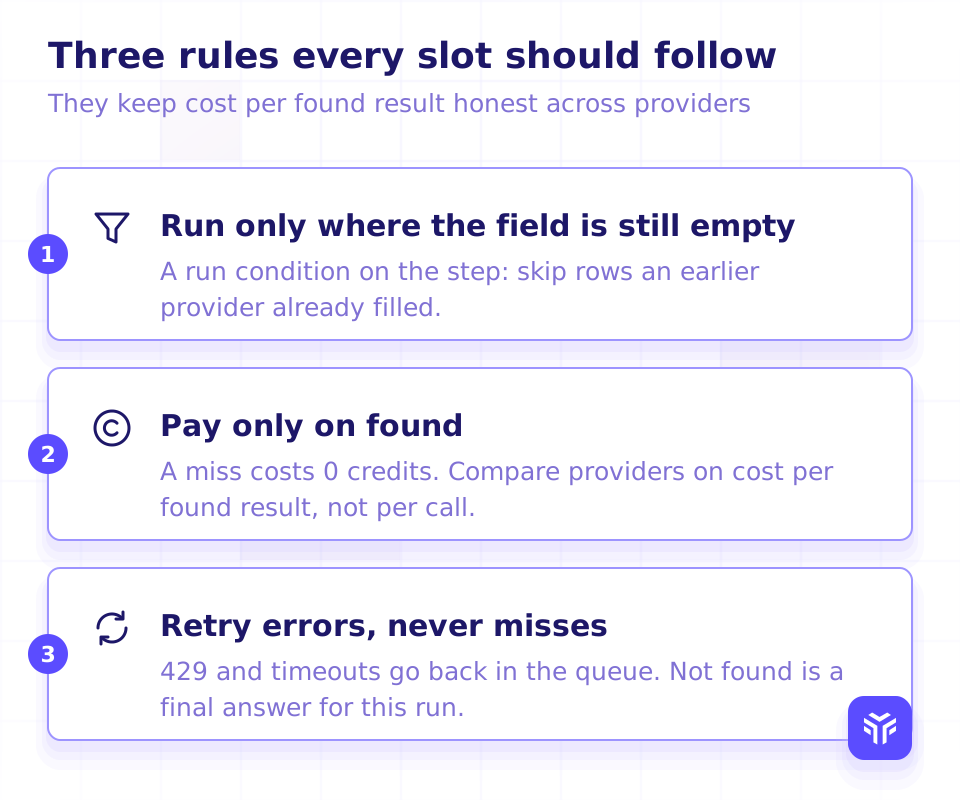
The articles on page 1 for "waterfall enrichment" are written for the operator choosing tools. This one is for the engineer wiring the steps. Three rules carry the whole design:
- A step runs only while the field is still empty.
- A step is paid only when it finds the field. A miss costs nothing.
- Errors go back in the queue. Misses do not.
One record's journey
Take one record: a name and company, or a LinkedIn profile URL. The waterfall sends it to provider A. If A returns the field, the run stops and you are charged once. If A returns nothing, the record moves to provider B with 0 credits spent. The same happens at B, then at the last step. A record that reaches the end with nothing found is logged as not found, and that is a normal outcome, not a failure.
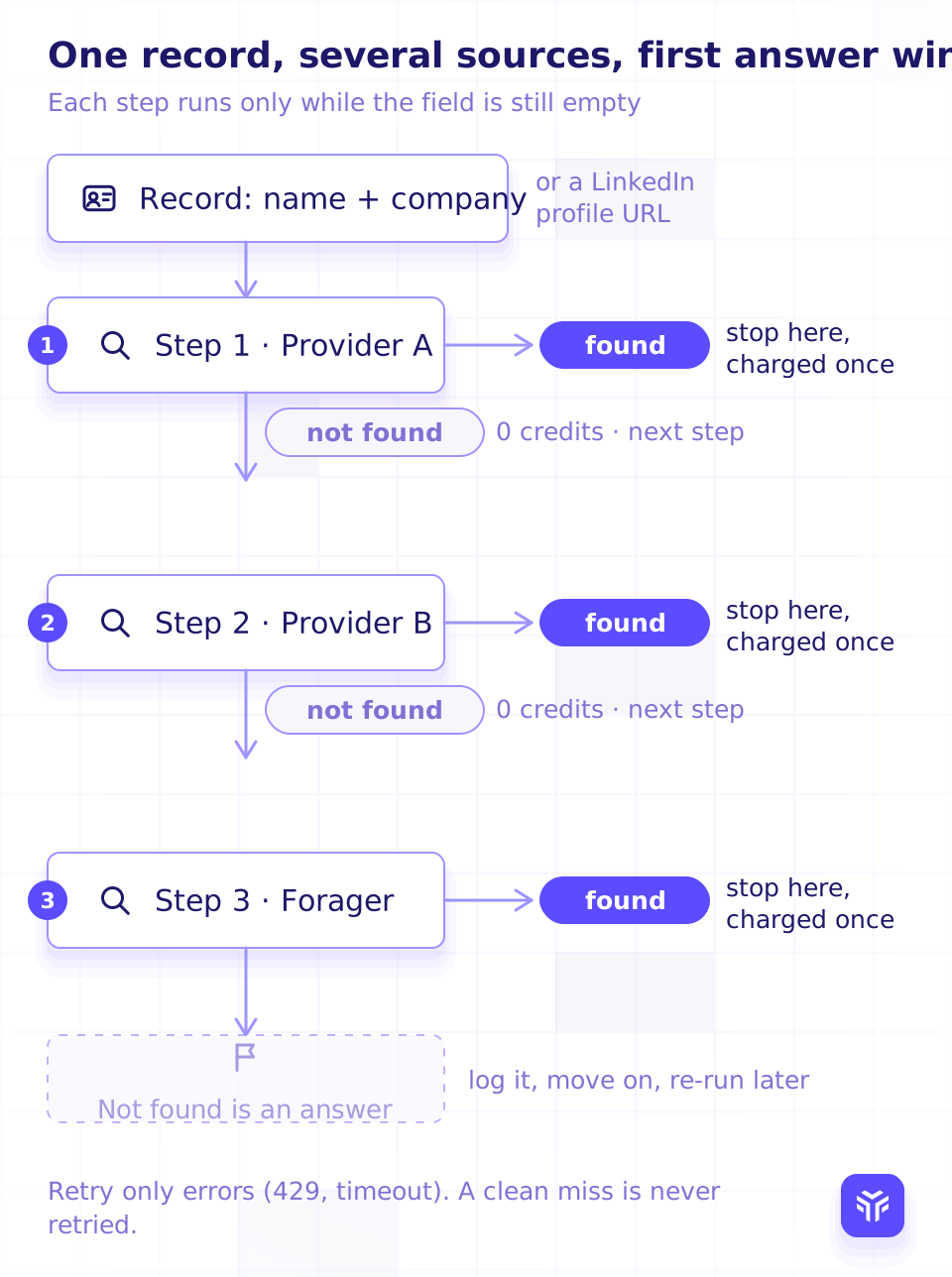
Two things in that picture are easy to get wrong in code. The first is that "found" ends the run for that field only. A record can have a work email from step 1 and still need a mobile from step 3, because email and mobile are separate waterfalls. The second is that the retry arrow only leaves the error branch. A clean "not found" never loops back.
Decide the order
Every provider will tell you to put it first. Decide the order with three inputs per slot, measured on your own records:
- What the source is good at. Some providers find work emails but not mobiles. Some cover one region well and another poorly. Put a provider where its field and region match the rows you send it.
- Cost per found result. Divide what a provider charges you by the number of fields it actually returned on your sample. A provider that charges per call and misses often costs more per found field than one with a higher list price that charges only on found.
- Latency. A slow step holds every record behind it. An interactive feature, such as a button in your app, can afford fewer steps than a nightly batch.
What page 1 says: ziellab's waterfall guide (retrieved 2026-11-01) orders providers by cost per hit as an operator heuristic. That is the second input above. It is the right instinct, and it is only one of the three.
Re-measure the order on a schedule. Hit rate on your own sample, and the connect rate your users report downstream, are the two numbers that move a slot up or down. Nothing a vendor publishes about its own hit rate should set your order.
When one provider is enough. A small list where one source already fills the field does not need a waterfall. If your sample shows that a second step adds almost nothing, the queue, the retries and the per-provider billing are cost without return. Build the waterfall when the misses from step 1 are worth more than the engineering.
to poll a work email lookup. A work email lookup is charged once, and only when an address is found.
Run conditions
The rule that keeps a waterfall cheap fits in one line:
run step N for record R only if field(R) is empty and R was not found by any earlier stepThat is a run condition on the step, not a filter you apply afterwards. Applied afterwards, you have already paid every provider for every record.
Keep one waterfall per field. A work email waterfall, a personal email waterfall and a mobile waterfall each have their own order, their own run condition and their own "found" state. A record that found its work email at step 1 still enters the mobile waterfall at step 1.
If your waterfall lives in a spreadsheet-style tool rather than your own code, the same rule is a run condition on the column: run this column only where the previous provider's column is empty. The mechanics differ, the rule does not.
The three outcomes every step returns
A provider's raw response has many shapes. Your pipeline should see three. Normalize every step to found, not_found or error before any other code touches it.
| Outcome | What it means | What it triggers |
|---|---|---|
found | The provider returned the field. | Write the value with provider attribution and the lookup date. Stop this waterfall for this record. Charged once. |
not_found | The provider answered and had nothing. | Log it. Pass the record to the next step. 0 credits. Never retried in this run. |
error | The provider did not answer: a 429, a timeout, an upstream failure. | Retry later with backoff. If it still fails, pass the record to the next step. |
Here is that mapping for the Forager work email step, from the waterfall recipe in the docs:
| Job | Pipeline result |
|---|---|
status is completed, result is found | found: use emails and stop |
status is completed, result is not_found | not_found: next step |
status is failed, error_code is person_not_found, no_current_employer or input_unresolved | not_found: retry once with name and domain if you have them, otherwise next step |
status is failed, error_code is provider_error, expired or internal_error | error: retry later, then next step |
| Polling timed out | error |
The one line to hold onto: not found is a final answer for this run. Retrying a miss spends nothing with a provider that charges on found, but it spends time, and with a provider that charges per call it spends credits for the same empty answer.
One more failure is not an outcome at all. A 403 means the key is missing or invalid. Every record will fail the same way, so stop the run and alert someone instead of passing 10,000 records to the next step.
Billing you can model
The order only works if you can compare providers on the same unit: cost per found result. That needs each provider's billing stated as behavior, not as a price list.
Forager's rules, from credit pricing:
- A work email lookup, single or in a batch, costs 5 credits, charged only when an address is found.
- A personal email lookup costs 5 credits only when at least one address is returned. A
200with an empty body is not charged. - A mobile number lookup costs 15 credits, charged only when a number is found. A lookup that finds nothing costs 0 credits.
- Polling a lookup or a batch never consumes credits.
- A bulk work email batch is rejected, and nothing is charged, if your balance cannot cover the whole batch.
So for the email steps the model is simple: credits spent = 5 × found. A miss adds 0 to the numerator and 1 to the rows sent, which is exactly what you want cost per found result to reflect.
What page 1 says: Apollo's "Waterfall Enrichment Overview" help article (retrieved 2026-10-20) states its own credit semantics in the same way, charged when a source returns data, with a 30-day window in which a record is not re-run. Put every provider's rule in the same table before you order them.
Async steps: submit, poll, callback
Some lookups answer in the request. Others return a job id and finish later. A waterfall step has to handle both without blocking the queue.
The Forager work email lookup is the second kind. Submit it, get a job_id at once, poll until the job is terminal, then normalize. Polling is free, and while the job is running a Retry-After header suggests when to poll again. The same step in three languages:
Submit
JOB_ID=$(curl -s -X POST "https://api-v2.forager.ai/api/v2/$FORAGER_ACCOUNT_ID/datastorage/person_contacts_lookup/work_emails/" \
  -H "X-API-KEY: $FORAGER_API_KEY" \
  -H "Content-Type: application/json" \
  -d '{"first_name": "Jane", "last_name": "Doe", "domain": "example.com"}' | jq -r .job_id)
import os, time, requests
BASE = f"https://api-v2.forager.ai/api/v2/{os.environ['FORAGER_ACCOUNT_ID']}/datastorage/person_contacts_lookup/work_emails/"
HEADERS = {"X-API-KEY": os.environ["FORAGER_API_KEY"]}
def submit(record):
r = requests.post(BASE, headers=HEADERS, json=record, timeout=30)
if r.status_code == 403:
raise SystemExit("bad key: stop the run") # every record would fail
r.raise_for_status()
return r.json()["job_id"]const BASE = `https://api-v2.forager.ai/api/v2/${process.env.FORAGER_ACCOUNT_ID}/datastorage/person_contacts_lookup/work_emails/`;
const headers = { "X-API-KEY": process.env.FORAGER_API_KEY, "Content-Type": "application/json" };
async function submit(record) {
const res = await fetch(BASE, { method: "POST", headers, body: JSON.stringify(record) });
if (res.status === 403) throw new Error("bad key: stop the run"); // every record would fail
if (!res.ok) throw new Error(`Forager ${res.status}`);
return (await res.json()).job_id;
}Poll with Retry-After, back off on 429
curl "https://api-v2.forager.ai/api/v2/$FORAGER_ACCOUNT_ID/datastorage/person_contacts_lookup/work_emails/$JOB_ID/" \
  -H "X-API-KEY: $FORAGER_API_KEY"
def poll(job_id, max_wait=120):
deadline = time.time() + max_wait
while time.time() < deadline:
r = requests.get(f"{BASE}{job_id}/", headers=HEADERS, timeout=30)
if r.status_code == 429: # rate limited: wait, then poll again
time.sleep(float(r.headers.get("Retry-After", 5)))
continue
r.raise_for_status()
job = r.json()
if job["status"] in ("completed", "failed"):
return job
time.sleep(float(r.headers.get("Retry-After", 2)))
return None # timed out: an error, not a missasync function poll(jobId, maxWaitMs = 120000) {
const deadline = Date.now() + maxWaitMs;
while (Date.now() < deadline) {
const r = await fetch(`${BASE}${jobId}/`, { headers });
if (r.status === 429) { // rate limited: wait, then poll again
await sleep(Number(r.headers.get("Retry-After") ?? 5) * 1000);
continue;
}
if (!r.ok) throw new Error(`Forager ${r.status}`);
const job = await r.json();
if (["completed", "failed"].includes(job.status)) return job;
await sleep(Number(r.headers.get("Retry-After") ?? 2) * 1000);
}
return null; // timed out: an error, not a miss
}
const sleep = (ms) => new Promise((ok) => setTimeout(ok, ms));Normalize to the three outcomes
NOT_FOUND = {"person_not_found", "no_current_employer", "input_unresolved"}

def outcome(job):
    if job is None:
        return "error"                                  # polling timed out
    if job["status"] == "completed":
        return "found" if job["result"] == "found" else "not_found"
    return "not_found" if job.get("error_code") in NOT_FOUND else "error"
const NOT_FOUND = new Set(["person_not_found", "no_current_employer", "input_unresolved"]);
function outcome(job) {
if (!job) return "error"; // polling timed out
if (job.status === "completed") return job.result === "found" ? "found" : "not_found";
return NOT_FOUND.has(job.error_code) ? "not_found" : "error";
}Two shapes of input are accepted: first_name, last_name and domain, or linkedin_public_identifier alone. Never send a domain and an identifier together; the request is refused, because the two can disagree about which company to search.
Single or bulk. The single lookup is rate limited for interactive use, so use it for the button in your app. For an enrichment run, submit a batch to the bulk work email lookup instead. You get a batch_id and a status_check_url, and results holds one result per submitted lookup in the order you sent them. Duplicates in a batch collapse into one lookup, and items already answered by Forager's cache resolve immediately.
Skip polling with a callback. Add an optional https webhook_url to the request and Forager POSTs the results there when the batch completes. Put any secret used to authenticate the callback in the URL query string; it is never returned by the poll endpoints or written to logs.
The two documented rate limits today are on the free endpoints: autocomplete at 10 requests per second per account and feedback at 60 requests per minute per account, both answered with a 429. Build the poll loop to honor Retry-After whatever the limit turns out to be, and you will not have to change it when the limits are published.
Caching and re-runs
The lookup that costs least is the one you do not repeat. Three rules:
- Store the date of every lookup, including misses. The record needs
field,provider,looked_up_atandoutcome. A miss with a date is information. A miss without one gets re-run by accident. - Re-run on a change, not on a timer. A person's work email changes when they change jobs. A mobile does not change because 30 days passed. Trigger a re-run from a job change you observe, or from a user reporting that a contact bounced, and leave the rest alone.
- Never re-spend inside your own window. Make the action idempotent. If a user clicks "find mobile" twice, the second click reads what the first one stored. Decide your window per field and enforce it before the request leaves your server.
If a user reports that an email bounced or a number was wrong, report it back to the provider too. Forager's feedback endpoints for work emails, personal emails and phone numbers are free, and they are how a bad result stops coming back.
Where Forager fits as a step
Forager is a step for three fields: mobile numbers, personal emails and work emails. Each is its own endpoint, so each sits in its own waterfall.
| Field | Endpoint | Input | Credits |
|---|---|---|---|
| Work email | POST /api/v2/{account_id}/datastorage/person_contacts_lookup/work_emails/ (async, poll or webhook) | first_name + last_name + domain, or linkedin_public_identifier | 5, only when an address is found |
| Personal email | POST /api/{account_id}/datastorage/person_contacts_lookup/personal_emails/ | linkedin_public_identifier or person_id | 5, only when at least one address is returned |
| Mobile number | POST /api/{account_id}/datastorage/person_contacts_lookup/phone_numbers/ | linkedin_public_identifier or person_id | 15 per mobile found; nothing found costs 0 credits |
The personal email endpoint returns webmail addresses only, each with a validation_status; drop the ones marked invalid before you write them. Phone results carry phone_number. If you start from a LinkedIn profile URL, the identifier is the slug in linkedin.com/in/<slug>/.
The index covers 800M+ people and 65M+ companies. Whether it earns a slot in your waterfall is for your sample to decide: run the rows your current providers missed through it and count the found results against the credits spent.
Read the full step, with tests for each outcome, in the waterfall recipe. The mobile version is on the use-case page.
FAQ
Does a step that finds nothing cost credits?
On Forager, a mobile, work email or personal email lookup that returns nothing costs 0 credits, and polling is always free. Other providers differ, and some charge per call. Put each provider's rule in the same table before you compare them.
Should the steps run sequentially or in parallel?
Sequentially, per field. Parallel calls to every provider mean you pay every provider that finds the field, which is the cost the waterfall exists to avoid. Run different fields in parallel if you like; the work email waterfall and the mobile waterfall are independent.
How many providers does a waterfall need?
As many as add found results on your sample at an acceptable cost per found result, and no more. One is enough for a small list where one source already fills the field. Measure the marginal finds of each added step and drop the ones that add almost nothing.
When should a record be run again?
When something about the record changed, such as a job change, or when a user reports that the contact no longer works. Not because a timer expired. Store the lookup date on every result and every miss so you can tell the two cases apart.
Is "not found" an error?
No. It is a complete answer from a provider that looked and had nothing. Log it, pass the record to the next step, and do not retry it in this run. Retry only errors: a 429, a timeout, an upstream failure.
Put Forager in your waterfall
Get a free API key with $5 in credits, wire the step from the recipe, and run your sample before you commit a slot.
- 800M+ people and 65M+ companies
- Mobile and email lookups that find nothing cost 0 credits
- Free API key to start
#1 of 10 in Clay's 2026 test of mobile data providers Source: Clay