








On this page
Key takeaways
- An enrichment API is an input and an output. You send one identifier you already hold, and you get back the fields you lack. List the identifiers your product actually stores before you compare vendors.
- The shape matters more than the vendor. A button, a dialer or an agent tool wants a live lookup. A search product or an ML pipeline wants a feed. An enrichment platform wants a waterfall slot.
- Model billing as behavior, not a list price. What does a miss cost? What does polling cost? What happens when the balance is short?
- Ask the rights questions before you sign: display to your users, what you keep after the term, and resale.
What page 1 says, and what it leaves out
Every page on Google's first page for "data enrichment api" (read 2026-11-01) does the same two things: a one-paragraph definition and a vendor list with record counts and prices. FullContact's definition (July 14, 2026) is typical. A contact enrichment API "takes a single identifier, such as an email address or phone number, and returns a fuller picture of that individual." Autobound's comparison (updated October 16, 2026) gets closest to what a product team needs. It ends its pricing section with four questions, including "May you store the data after the contract ends?", and leaves them open. Autobound also says it "did not test data quality."
Nobody on page 1 says whether your product needs an API at all, what a miss returns, whether the miss is billed, or how to run a test on your own records. That is this page.
What an enrichment API takes and returns
Start from what you hold. The table maps each input to the Forager endpoint that returns what you need, with the credits each call uses. Endpoint names are as the docs list them.
| You have | You get back | Endpoint | Credits |
|---|---|---|---|
A LinkedIn handle or a person_id | The full person record: roles, education, skills, location | POST /datastorage/person_detail_lookup/ | 1 per request |
A LinkedIn handle or a person_id | Phone numbers, as a list of phone_number values | POST /datastorage/person_contacts_lookup/phone_numbers/ | 15 per mobile found; nothing found costs 0 credits |
A LinkedIn handle or a person_id | Personal emails, webmail only, each with a validation_status | POST /datastorage/person_contacts_lookup/personal_emails/ | 5, only when at least one address is returned |
| First name, last name and company domain, or a LinkedIn handle | The work email at the person's current company | POST /api/v2/.../person_contacts_lookup/work_emails/ | 5, only when an address is found |
| A personal email address | The person behind it, as a person record | POST /datastorage/person_detail_reverse_lookup/by_email/ | 5 per request |
| A phone number | The person behind it | POST /datastorage/person_detail_reverse_lookup/by_phone_number/ | 15 per request |
| A company domain | Web rank, a traffic estimate and the web technologies on the site | POST /datastorage/website_detail_lookup/ | 1 per request |
Three details save you a refactor later.
- The LinkedIn handle is the slug in
linkedin.com/in/<slug>/, sent aslinkedin_public_identifier. The person record carries anid, which the phone and personal email lookups accept asperson_id. Store it on the contact the first time you see it. - The work email lookup does not take a
person_id. It takes a name and domain, or the handle, and refuses a request that sends both. - The reverse email lookup is documented for personal email addresses. If your product holds work emails and nothing else, start from the name and domain instead.
If you have criteria rather than a person (a title, an industry, a location), that is a search, not an enrichment. People search, company search and job postings are separate endpoints, charged per call, and the filters take IDs from the free autocomplete endpoints.
in Clay's 2026 test of mobile data providers. Forager ranked first of the ten providers Clay tested.
Three shapes: live API, bulk feed, waterfall slot
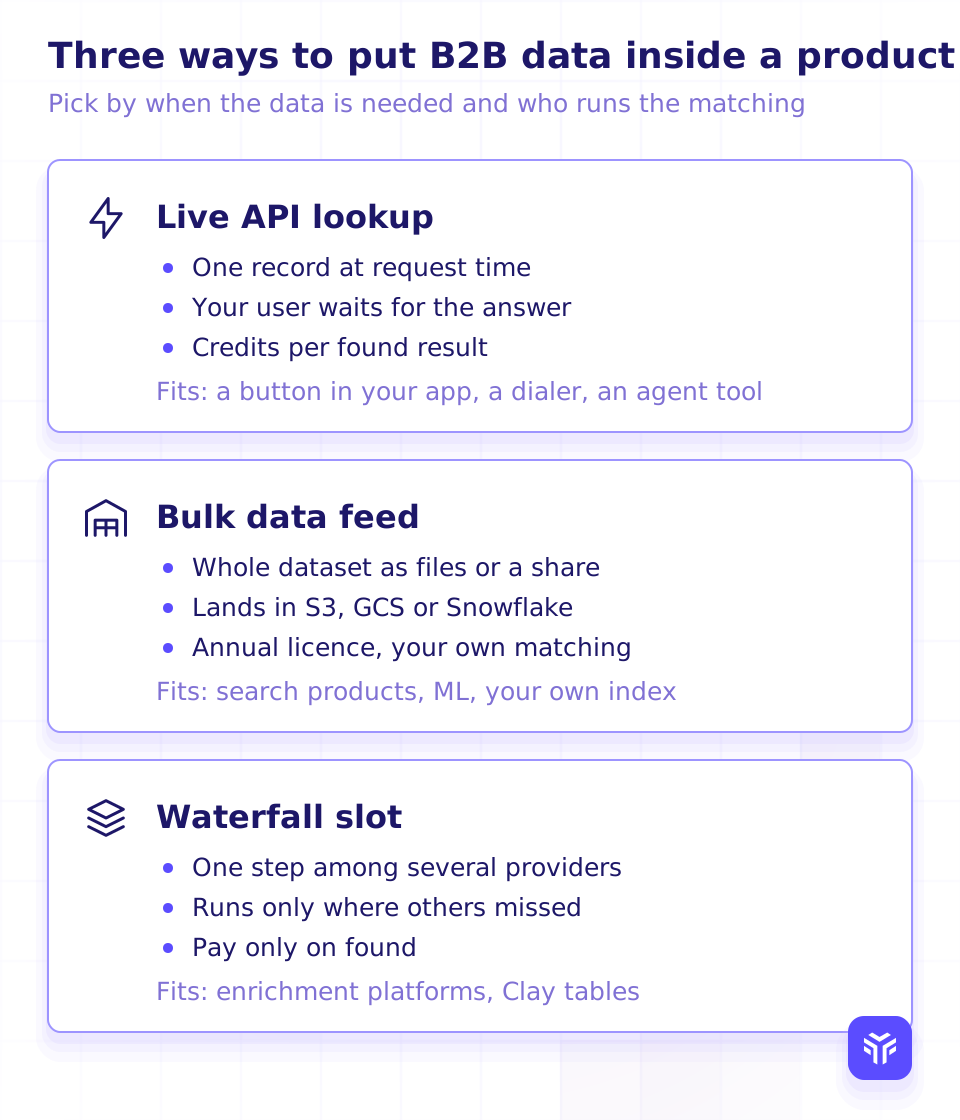
The same data reaches a product in three shapes. Pick by when the data is needed and who runs the matching.
| The product you are building | Shape | Why |
|---|---|---|
| A "Get contact details" button in your app | Live lookup | One record at request time. Your user waits for the answer, so run only the lookup they asked for. |
| A dialer | Live lookup, mobile first | The number has to ring for the right person. |
| An agent tool | Live lookup behind a server-side executor | The agent decides per record. Give it a call budget and keep the key out of the model's reach. |
| A search product, or your own index | Bulk feed | You need every record in a universe, not the ones your users happen to ask about. |
| An ML pipeline or analytics | Bulk feed | Joins and training want the whole table in your warehouse. |
| An enrichment platform | Waterfall slot | Forager runs only on the rows your other providers missed, and a work email lookup that finds nothing costs 0 credits. |
One honest line. A product that needs every record of a universe wants a feed, not an API. The docs say the same thing: for whole datasets, a data feed is usually cheaper than the API. Forager feeds cover 800M+ people and 65M+ companies under an annual license, delivered as a Snowflake private listing or as compressed drops to your S3 or GCS bucket, daily, weekly or monthly, NDJSON by default with CSV, TSV and Parquet available. Delivery cadence and refresh cadence are different things. Delivery is how often files land in your bucket. Refresh terms are written into the agreement.
The waterfall slot is its own topic. The companion guide, How to build an enrichment waterfall into your product, covers slot order, retries and what a miss should do. The docs recipe for a single waterfall step has the code.
Billing you can model
A price per credit tells you nothing until you know when a credit is spent. Forager's credit pricing describes four behaviors you can put in a spreadsheet.
- Found or per request. A work email lookup, single or in a batch, costs 5 credits, charged only when an address is found. A personal email lookup costs 5 credits only when at least one address is returned; a
200with an empty body is not charged. Person lookups, reverse lookups, website lookups and searches are charged per request, whether or not the record is rich. A mobile number lookup costs 15 credits, charged only when a number is found. - Polling is free. Checking the status of a work email job or batch never consumes credits.
- A short balance rejects the whole batch. A bulk work email batch is refused, and nothing is charged, if your balance cannot cover every lookup in it. Nothing is partly charged.
- Cache hits and duplicates. In a bulk batch, items already answered from Forager's cache resolve immediately, and duplicate rows in one request collapse into a single lookup.
For a work email slot in a waterfall, the cost line is 5 credits times the rows Forager answers. For a person or company enrichment feature, it is credits times requests. Reporting a bad result through the feedback endpoints is free, at 60 requests a minute shared across the three.
The /pricing page carries the plan prices and the current mobile and email credit figures. The numbers above were read from the docs on 2026-11-01; check them against /pricing before you publish a cost calculator.
Latency and async
Some lookups answer in the request. Others hand you a job to poll. Your UI should know which is which before you wire a spinner to it.
Answered in the request. The person lookup, phone lookup, personal email lookup, both reverse lookups and the website lookup are documented as a single POST whose response body is the result.
Answered by a job. The work email lookup, single or bulk, returns 202 at once with a job_id (or a batch_id for bulk) and a status_check_url. The job moves through queued, running and awaiting_provider to completed or failed. While it runs, a Retry-After header suggests when to poll again. A bulk batch returns an empty results array until its status is completed, then one result per submitted lookup in the order you sent them. Add an https webhook_url to the request and Forager posts the results there instead, with any secret you need carried in the URL query string, where the poll endpoints never return it and the logs never write it.
Two rules follow from this. The single work email lookup is rate limited for interactive use, so an enrichment run belongs on the bulk endpoint. A 403 means the key is missing or invalid, so stop the run; a 429 means back off and retry. The documented rate limits are 10 requests a second for autocomplete and 60 a minute for feedback. The docs do not publish limits for the other endpoints today, so build the client to honor Retry-After whatever the limit turns out to be.
What you may store, show and resell
This is the section page 1 skips, and the one your legal team will read. Put four questions to every vendor, in writing, before the data touches a user-facing screen.
- Display. May we show the returned fields to our own users, inside our product?
- Retention. What happens to records we stored when the agreement ends?
- Resale. May we include the data in something we sell, or pass it to our users' own systems?
- Reuse. Are our lookups used to answer other customers?
Forager's answers for platforms are set in the agreement: display and resale terms are agreed on a call, and resale is agreed separately from API access. The platforms page lists what is covered.
Test on your own sample first
Send a list of profiles you care about. We run it and show you what we find, number by number, so you can measure hit rate and connect rate yourself.
The protocol is the same for any vendor, us included.
- Pull a few hundred records your users actually looked up last month. Keep the input exactly as sent.
- Send the same rows to each vendor, through the same identifier (handle, email, or name and domain).
- Count what came back, and count what was right. A row with a number that rings for someone else is a miss.
- Divide what you paid by the right results. Compare that figure, not the price per lookup.
Build vs buy: what stays yours
Buying the data does not buy the feature. Five things stay product decisions whoever the vendor is.
- Matching keys. Decide which identifier you trust for each record, and store the vendor's
idso you never resolve the same person twice. - Caching. Store the lookup date next to the field. Decide how old a result may be before your product asks again.
- Consent and opt-out handling. Your product decides who may be looked up, who may see the result, and how a removal request flows through.
- Error routing. Map every outcome to found, not found or error. Not found is a normal answer; retry the errors, never the misses.
- Waterfall order. Which provider runs first, which runs only on misses, and what a slot has to earn to keep its place.
Forager provides the record, the billing rule and the IDs. The rest is the part your users will judge as yours.
FAQ
What inputs does an enrichment API accept?
Forager's lookups take a LinkedIn public identifier or a Forager person_id for a person, a first name, last name and company domain for a work email, a personal email address or a phone number for the reverse lookups, and a domain for a website. Search endpoints take filter IDs instead of a person.
Does a lookup that returns nothing cost credits?
A work email lookup is charged only when an address is found, and a personal email lookup only when at least one address is returned. Person lookups, reverse lookups, website lookups and searches are charged per request. Polling a work email job is free. A mobile number lookup is charged only when a number is found.
Should I use an API or a data feed?
Use the API when your product asks about one record at a time: a button, a dialer, an agent tool, a waterfall slot. Use a feed when your product needs the whole universe: search, your own index, ML, analytics. The docs say a feed is usually cheaper than the API for whole datasets.
Can I show enriched data to my users?
Display and resale terms for platforms are agreed in the contract. Ask on a call before you design the screen.
How fast is a lookup?
Person, phone, personal email, reverse and website lookups answer in the request. Work email lookups return a job at once and finish asynchronously, with a Retry-After header while they run and an optional webhook when they complete.
Add enrichment to your product
Get a free API key with $5 in credits and run the lookups on records your users actually asked about, or book a demo and bring a sample.
- 800M+ people and 65M+ companies
- Mobile and email lookups that find nothing cost 0 credits
- Free API key to start
#1 of 10 in Clay's 2026 test of mobile data providers Source: Clay