








Read the video (18 seconds, loops, no voiceover)
- Work email lookup v2. Find a work email and check it's deliverable. Send a name and company domain. Get a job id back right away.
- Your app never waits. Poll for the result, or get a webhook when the job is done.
- You pay only when an address is found. Address found: 5 credits. Not found: 0 credits. Polling: free.
- Bulk endpoint: send many people at once. Duplicates in a batch collapse into one lookup.
- Try work email lookup v2. For platforms, enrichment waterfalls and AI agents.
On this page
Key takeaways
- The new lookup finds a work address and checks that it is deliverable before you are charged.
- It runs as a job: poll status_check_url or pass a webhook_url. Your app never holds a connection open.
- 5 credits per lookup that finds an address. Not found and polling cost 0. A bulk endpoint takes many people at once.
Forager's work email lookup has a new version. It finds a person's work address, checks that the address is deliverable, and charges you only when it finds one.
It runs asynchronously. You send a person, get a job id back right away, and collect the result when it is ready. A bulk endpoint takes many people in one request.
What the lookup does
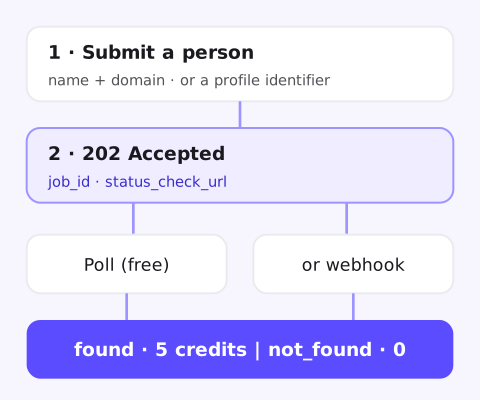
Send a POST to /api/v2/{account_id}/datastorage/person_contacts_lookup/work_emails/. Identify the person one of two ways:
- Name and company:
first_name,last_nameanddomaintogether. - A profile identifier:
linkedin_public_identifieralone. Forager then uses the person's name and current employer from its dataset.
The address is checked for deliverability before the job finishes. A finished job has result set to found or not_found, so your code never has to guess.
Submit, then collect the result
curl -X POST "https://api-v2.forager.ai/api/v2/$FORAGER_ACCOUNT_ID/datastorage/person_contacts_lookup/work_emails/" \
  -H "X-API-KEY: $FORAGER_API_KEY" \
  -H "Content-Type: application/json" \
  -d '{"first_name": "Jane", "last_name": "Doe", "domain": "example.com"}'
The response is 202 Accepted with a job_id and a status_check_url. Then pick one way to get the result:
- Poll
status_check_url. While the job runs, theRetry-Afterheader says when to ask again. - Webhook: pass a
webhook_urlon the request, and Forager calls it when the job finishes.
A job moves through queued, running and awaiting_provider to completed or failed. A completed job that found an address returns it in emails, with the person_id and the lookup you submitted.
Why it runs as a job
Checking that an address is deliverable takes time. A synchronous call would hold a connection open while that happens.
As a job, nothing waits. Your app, job runner or agent submits the person and moves on. That matters most for:
- Platforms that look up emails for their own users and can't block a request on a slow check.
- Enrichment waterfalls that fan out to several sources and collect results as they land.
- AI agents that call tools in a loop and shouldn't stall on one of them.
Look up many people at once
For enrichment runs, send a batch to the bulk endpoint. Duplicates in a batch collapse into one lookup, so you don't pay twice for the same person.
If your balance can't cover the whole batch, it is rejected and nothing is charged. The single lookup is rate limited for interactive use, so use bulk for volume. The bulk guide walks through a full run.
What it costs
| Credits | |
|---|---|
| Lookup that finds an address (single or in a batch) | 5 |
| Lookup that finds nothing | 0 |
| Polling a job or a batch | 0 |
You are charged once per lookup that finds an address, however many addresses it returns. Polling never uses credits, so poll as often as Retry-After allows.
Credits come from the same balance as every other lookup. See the credit pricing docs for every endpoint's cost.
Already using the work email lookup?
The new version lives under /api/v2/. Move a call over when you are ready: submit the job, then poll or listen for the webhook instead of waiting on one response. The API reference has every field and status.
FAQ
How much does a work email lookup cost?
5 credits per lookup that finds an address, single or in a batch. A lookup that finds nothing costs 0 credits, and polling is free.
Do I have to poll for the result?
No. Pass a webhook_url and Forager calls it when the job finishes. Polling status_check_url works too, and the Retry-After header says when to ask again.
How do I identify the person?
Send first_name, last_name and domain together, or a linkedin_public_identifier alone. With the identifier, Forager uses the person's name and current employer from its dataset.
Is the email checked before I'm charged?
Yes. The lookup checks that the address is deliverable before the job finishes, and you are charged only when it finds one.
Can I look up a whole list?
Yes. The bulk endpoint takes many people in one request. Duplicates collapse into one lookup, and a batch your balance can't cover is rejected with nothing charged.
Find work emails for your list
Send a sample of people you care about. We run them through the work email lookup and show you what comes back, address by address.
- 5 credits per work email found
- No address, no charge
- Polling is free
#1 of 10 in Clay's 2026 test of mobile data providers Source: Clay